The PlayStation App is a free app from Sony Interactive Entertainment for Android phones and iPhones. It links your phone to your PlayStation Network (PSN) account. So you can chat with friends, shop for games, check trophies, and start game downloads on your console, even when you’re away from home.
It does not let you play PS5 or PS4 games on your phone. It’s a companion app, not a console replacement.
What is PlayStation App?
PlayStation App is a free mobile app from Sony that connects your phone to your PlayStation Network account.
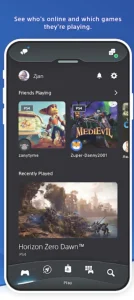
You can use it to browse and buy games, start downloads on your PS5 or PS4 remotely, chat with friends, and check your trophies. It does not play games on your phone. You may like temple run 3
Important Key Features
PlayStation App Store access
Browse games, read details, check deals, and buy digital games right from your phone. Prices depend on your country.
Remote game downloads
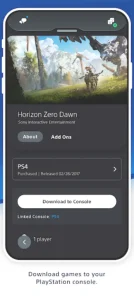
Start a download on your PS5 or PS4 from anywhere. Your console must be online, linked to the same account, and set up for remote features (usually Rest Mode).
Friends and messaging
In PlayStation app Send messages, share photos and clips, see who is online, and join voice chat. Planning game sessions becomes easy.
Trophies and profile
Check your trophies, your profile, and your friends list. It’s a fast way to track your progress.
Notifications
Get alerts for messages, game invites, and friend activity. You can turn off the ones you don’t need.
Console linking
Connect your phone to your PS5 or PS4 with one PSN account to control downloads and other console features.
Free to use
The app costs nothing. You only pay for games, add-ons, and subscriptions like PlayStation Plus.
Works without a console
You can still browse the store, chat, and view your profile. Only console-related features need a PS5 or PS4.
Account security
Supports two-step verification to keep your account safe.
The app does not run games on your phone. For streaming games from your console to your phone, use the separate PS Remote Play app.
PlayStation App System Requirements
The following table shows the minimum device requirements for the PlayStation App.
| Requirement | Android | iPhone / iPad |
|---|---|---|
| Operating system | Android 8.0 or later | iOS 15.1 or later |
| Device | Compatible Android phone or tablet | Compatible iPhone or iPad |
| App size | Varies by device | Approximately 123 MB |
| Internet connection | Required for online features | Required for online features |
| PlayStation account | Required | Required |
| Storage space | Enough free space to install and update | Enough free space to install and update |
| Console | PS4 or PS5 needed for certain features | PS4 or PS5 needed for certain features |
| Price | Free to download |
How to Download and Install PlayStation App?
-
Open Google Play (Android) or the App Store (iPhone).
-
Search for “PlayStation App.”
-
Check that the publisher is Sony Interactive Entertainment.
-
Tap Install or Get.
-
Open the app and sign in with your PSN account, or create a new one.
-
Allow notifications if you want alerts.
Only install from official app stores. Modified APK files from random websites can carry malware or steal your login details.
Is It Free?
Yes. The app costs nothing. Games, add-ons, and subscriptions are paid separately. Online multiplayer on a PlayStation console also needs a PlayStation Plus subscription. Always check the price before you buy.
Can You Use It Without a Console?
Yes. You can still browse the store, chat with friends, and view your profile. Features that control a console, such as remote downloads, need a PS5 or PS4.
PlayStation App vs PS Remote Play
These are two different apps. People often mix them up. PlayStation App PS Remote Play Main use Store, chat, trophies, remote downloads Streams games from your console to your phone Needs a console? Only for some features Yes, always Plays games on your phone? No Yes, over the internet
Is It Safe?
The official app is safe. To protect your account
-
Use a strong password that you don’t use anywhere else.
-
Turn on two-step verification.
-
Never share your password or verification codes.
-
Stay away from “free credits” or “free games” apps. They are usually scams.
Common Problems and Quick Fixes
Can’t sign in
Check your internet, then make sure your email and password are correct. Reset your password on the official PlayStation website if needed.
Console not showing up
Use the same account on both devices, and check the console’s network and remote settings.
Downloads won’t start
Make sure the console is online, has enough free storage, and is allowed to wake or stay on in Rest Mode.
No notifications
Check your phone’s settings and allow alerts for the app.
If none of this works, contact PlayStation Support.
Frequently Asked Question
What is it PlayStation App?
A free Sony app for Android and iPhone that links your phone to your PSN account. You can shop for games, start remote downloads on your PS5 or PS4, chat with friends, and check trophies.
Is PlayStation App on PC?
No. For PC, use PS Remote Play to stream games from your console.
How to install PlayStation App?
Open Google Play or the App Store, or your trusted website such as apkfunk.com search “PlayStation App,” check the publisher is Sony Interactive Entertainment, tap Install, then sign in.
Why not in my country?
Sony only supports certain regions, and your app store region may be unsupported. Check Sony’s official region list, and avoid APK files from random websites.
Can I play games on my phone with it?
No. Use PS Remote Play for that.
Conclusion
The PlayStation App is a simple, useful tool for anyone with a PS5 or PS4. It saves you time with remote downloads and keeps you connected to friends.
Download the official version, secure your account, and set up your console’s remote settings, and it will work smoothly.