
Zombie shooters are among the most popular genres on mobile, and Zombie Fire is a name that shows up more than once. Two separate games use it, built by different studios. Here’s what each one offers.
Two Games, One Name
Zombie Fire (also listed as Zombie Fire: FPS) comes from the developer Mobirix. It was released on Microsoft’s store in December 2023 and is rated for ages 16 and up.
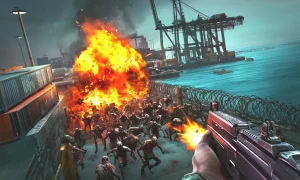
Zombie Fire 3D: Offline Game is a separate title published by VNG Game Studios. It is described as a first-person shooter set in an apocalyptic warzone, and it is billed as coming from the creators of Dead Target and Zombie Hunter. You may also like temple run 3
Zombie Fire by Mobirix
This version focuses on weapon variety and tactical switching. Players move between a machine gun, a pistol and grenades, and can upgrade each weapon to strengthen its special traits. That encourages you to match the weapon to the threat rather than hold the trigger down.
The game has many stages with different zombie types and giant boss monsters. There are also extra modes:
-
Survival Mode: You fire every weapon you’ve earned until the timer runs out.
-
Bonus Mode: You use a bazooka to blast through the zombies.
Achievements and a leaderboard are supported, and the game plays offline. Its App Store rating was 4.4 out of 5 from 155 ratings at the time of the listing.
Requirements
iPhone / iPad
-
Zombie Fire 3D: Offline Game requires iOS 13.0 or later and is designed for iPad.
-
Zombie Fire (Mobirix) also requires iOS 13.0 or later.
Windows PC (Mobirix’s Zombie Fire)
-
The Microsoft Store listing says the app is about 220 MB, works with Windows 10 devices, and can be installed on up to ten of them while signed in to your Microsoft account.
-
It’s rated for ages 16 and up.
Android
-
I couldn’t find the minimum Android version. It’s shown on the game’s Google Play page under “About this app” or in the device compatibility section.
PC or Mac via emulator
-
BlueStacks lists small requirements for PC of the game, but in my page i didn’t show them. Check the BlueStacks page for the current specs.
-
How to Download Zombie Fire APK?
On iPhone or iPad
-
Open the App Store.
-
Search for “Zombie Fire 3D: Offline Game” (VNG Game Studios) or “Zombie Fire: FPS” (Mobirix).
-
Tap Get, then confirm with Face ID, Touch ID or your Apple ID password.
On Android
-
Open Google Play Store.
-
Search for the same names and check the publisher.
-
Tap Install.
On Windows
-
Open the Microsoft Store and search for “Zombie Fire” from Mobirix.
-
Sign your Microsoft account and install.
On PC or Mac with BlueStacks
-
Download BlueStacks from the game’s page and launch it.
-
Search for the game in the top-right search bar and click to install it from the results.
-
Complete the Google sign-in if prompted, then click the game’s icon on the home screen to play.
Tips
-
Many similar zombie shooters exist, such as Fire Apocalypse: Zombie Games, so check the developer name before installing.
-
Both games are free with in-app purchases.
-
Download only from official stores. Third-party APK sites can carry malware.
Do you want the Android version or the iOS one? I can check details for whichever device you have.
-
Zombie Fire 3D: Offline Game
The 3D version leans into immersion. It promises 3D graphics with destructible environments, and missions that each feature a different kind of undead enemy. The goal is to be the last survivor, and it also plays without Wi-Fi.
Players seem to like it. One store listing shows an average rating of 4.9 across more than 11,000 reviews, with an update in July 2026.
Why Offline Play Matters
Both games work without an internet connection, which suits quick sessions on a commute, in a waiting room or anywhere the signal is poor. Offline play also means no lag and no matchmaking, so you can pick up where you left off whenever you like.
Playing on PC
You don’t need a phone to play. Zombie Fire can be run on PC or Mac through the BlueStacks emulator, which offers a shooting mode and higher frame rates.
A Few Practical Notes
-
Both games are free to download but include in-app purchases, so check the store page before you spend.
-
Mobirix’s listing says some data, such as location and identifiers, may be used to track you across other companies’ apps. If privacy matters to you, review the settings and the developer’s policy.
-
Because the names are so similar, make sure you download the one you want by checking the publisher.
Final Verdict
The Mobirix version suits players who like upgrading weapons and working through varied stages and modes. The 3D version suits those who want a more immersive first-person experience. Both are free, offline and easy to pick up, which makes either a good option for a quick zombie-shooting session.
Would you like me to adjust the tone, change the length, or focus on just one of the two games? I can also put it in a file if you’d like.